Battery at a glance everywhere
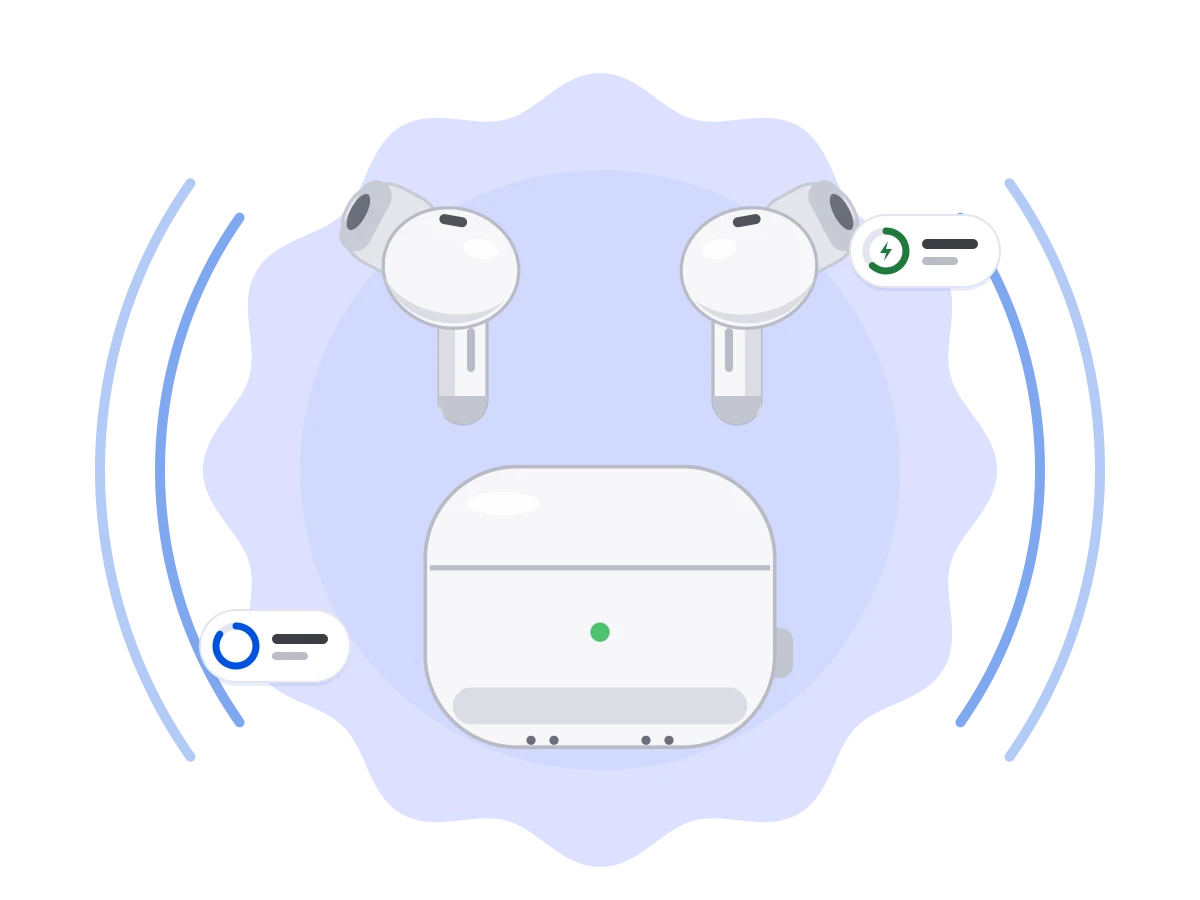
Left, right and case separately, with charging indicator. In the tile, the widget, the pop-up and the app.
 PodPilot
Europe
Americas
Asia & Pacific
Middle East & Africa
No language found.
Ready for AirPods 5 – plus AirPods Pro 3 & Max 2, on Android 17 & Pixel
PodPilot shows the battery of your left and right earbud and the case, pops up a sheet when you open the lid, and switches noise cancellation, transparency and adaptive mode right from Quick Settings.
This is the app's interface in your browser: switch noise modes, play with the equalizer and flip through the Pro settings. Nothing is installed, nothing is sent anywhere.
This is the PodPilot app as a live demo. All Pro features are unlocked: switch, tap and listen to what changes.
Simulation in your browser, no AirPods needed. In the app, the controls are part of PodPilot Pro and need Android 16 QPR3 or newer. Which settings appear depends on your model.
Drag the bands or pick a preset. With sound on, you hear the difference right away.
Plays a short music loop generated in your browser. Nothing is uploaded.
Your browser can't play sound here.
Shape the sound of these AirPodsOn · active in 1 appBandsFlatBass boostLess bassTreble boostVocalsSpoken wordLoudnessCustomPersonalSound onSound off{0} Hz bandDemo with sample values. In the app PodPilot talks to your real AirPods.
The AirPods feeling right on your Android phone – in the Material You look, with your system colors.
Left, right and case separately, with charging indicator. In the tile, the widget, the pop-up and the app.
Open the case near your phone and a bottom sheet with all battery levels slides up.
One tile shows the battery, a second one cycles the noise mode. Long-press opens the control panel.
Off, noise cancellation, transparency and adaptive – whatever your model supports.
Presets and 10 bands, saved separately for each pair of AirPods. Works with player apps that register their audio playback with Android – more in the FAQ.
A short listening test for each ear, then PodPilot tunes the equalizer to your hearing. Not a medical test and no substitute for a hearing test by a doctor or audiologist.
Conversation awareness, personalized volume, ear detection with automatic pause, custom press-and-hold action and renaming your AirPods.
Nod to answer a call, shake your head to decline – without touching your phone. On models with head gestures (see table).
Transparency on in the car, your EQ preset when you put them in, quieter in the evening: triggers like connecting, ears in/out or time of day switch noise mode, EQ, conversation awareness and volume.
Earbud lost between the sofa cushions? PodPilot plays a sound through your AirPods while they are connected to your phone.
How much capacity do your AirPods have left? PodPilot estimates it and shows a forecast of how it develops. Estimates, not measurements.
Battery and noise mode on your wrist: as a tile and as a complication on your Wear OS watch face.
Where and when were your AirPods last connected? PodPilot remembers the place and time of the last connection – only on your device. Needs location access, no live tracking.
Each pair gets its own profile with EQ, noise mode and settings – PodPilot applies it when they connect.
Small and frugal: it only updates when something actually changes – no background ticking.
PodPilot actions and states in Tasker: build your own automations around your AirPods.
“Your AirPods since …” for each pair: PodPilot remembers when it first detected them. You can enter the purchase date yourself.
Rate the sound from 1 to 5 stars and see in the history how it changes with age, mode and EQ. Stays entirely on your phone.
Black, white or blue: pick how PodPilot looks on your home screen under Settings › Appearance › App icon.
Missing something? Send your idea right from the app. PodPilot gets regular updates – you can submit wishes anytime.
Downloading and the basics cost nothing – no third-party ads, no time limit. PodPilot Pro unlocks everything your model and your phone can do.
0 forever
Monthly with a 7-day free trial, or once for good. Google Play shows the price in your currency.
Everything in Free, plus:
Buy once on this site and unlock the app with a license code or your PodPilot Pro account – no e-mail address needed.
1 On Android 16 QPR3 or later, and only if your model has the feature – see the model table. 2 For player apps that register their playback with Android – see the equalizer FAQ. In-app purchase, payment and cancellation are handled by Google Play.
PodPilot detects every AirPods generation automatically. Which features you get depends on the model and your Android version.
| Any Android 10+ | Android 16 QPR3+ | ||||||||||
|---|---|---|---|---|---|---|---|---|---|---|---|
| Model | Battery L/R/case | Connection pop-up | Tile & widget | Noise modes | Conversation awareness | Personalized volume | Ear detection | Customize controls | Rename | Head gestures (calls) | Find tone |
| AirPods (1st gen) | yes | yes | yes | no | no | no | yes | yes | yes | no | yes |
| AirPods (2nd gen) | yes | yes | yes | no | no | no | yes | yes | yes | no | yes |
| AirPods (3rd gen) | yes | yes | yes | no | no | no | yes | yes | yes | no | yes |
| AirPods 4 | yes | yes | yes | no | no | no | yes | yes | yes | yes | yes |
| AirPods 4 with ANC | yes | yes | yes | ANC · TR · AD | yes | yes | yes | yes | yes | yes | yes |
| AirPods 5 | yes | yes | yes | ANC · TR · AD | yes | yes | yes | yes | yes | yes | yes |
| AirPods 5 with Wireless Charging Case | yes | yes | yes | ANC · TR · AD | yes | yes | yes | yes | yes | yes | yes |
| AirPods Pro (1st gen) | yes | yes | yes | ANC · TR | no | no | yes | yes | yes | no | yes |
| AirPods Pro 2 (Lightning / USB‑C) | yes | yes | yes | ANC · TR · AD | yes | yes | yes | yes | yes | yes | yes |
| AirPods Pro 3 | yes | yes | yes | ANC · TR · AD | yes | yes | yes | yes | yes | yes | yes |
| AirPods Max (Lightning / USB‑C) | yes | yes | yes | ANC · TR | no | no | yes | yes | yes | no | yes |
| AirPods Max 2 | yes | yes | yes | ANC · TR · AD | yes | yes | yes | yes | yes | no | yes |
ANC = noise cancellation · TR = transparency · AD = adaptive audio · ✓ = supported · – = not available on this model
Some features also depend on your AirPods' firmware. PodPilot asks your AirPods what they can do when they connect and hides the rest.
AirPods talk to a phone in two ways. They broadcast their status over Bluetooth Low Energy – model, battery levels, whether the case is open. Every Android phone from version 10 can read that, which is why battery, pop-up, tile and widget work everywhere.
Settings need a dedicated data channel to the AirPods. For a long time regular Android apps were not allowed to open it – only with root. Starting with Android 16 QPR3, Android allows it without root. Pixel phones get the update first; other manufacturers follow.
PodPilot comes in a refined black. Prefer light or the classic blue? Switch with one tap under Settings › Appearance › App icon – free, no restart.
 Black default
 White
 Blue


Battery levels, settings, equalizer, listening test, automations and “Last seen” places are only processed on your device. Usage statistics and crash reports only if you allow them. No third-party ads in the app. All details: privacy policy.
No. PodPilot works entirely without root. On Android 10 to 16 QPR2 you get battery, pop-up, tile and widget; from Android 16 QPR3 you also get settings such as noise modes.
Yes – battery, pop-up, tile and widget run on every Android phone from Android 10. The extended settings depend on whether your manufacturer ships Android 16 QPR3 (or later) and doesn't restrict the Bluetooth channel. PodPilot checks this automatically. Tip: exclude PodPilot from battery optimization (Settings › Apps › PodPilot › Battery › “Unrestricted”).
The download is free, and in-app battery levels, the connection pop-up, the icon choice and “Request a feature” stay free forever. PodPilot Pro unlocks tiles, widget, noise modes, ear detection, equalizer, Wear OS and all other features – monthly with a 7-day free trial (after 12 paid months Pro is yours for good) or once. Google Play shows the price in your currency.
Start the monthly subscription in the app; the first 7 days cost nothing. Cancel before the trial ends and you pay nothing. The trial is available once per Google account. Billing and reminders come from Google Play.
Yes, as soon as web purchase is live: PodPilot Pro Lifetime. You get a license code that you redeem in the app under Settings › PodPilot Pro. If you like, you create a PodPilot Pro account with just a username and password – no e-mail address – and sign in on up to 5 devices.
No – and we'd rather say so up front. Without root, an app may only change the sound of playback that the playing app registers with Android (its “audio session”). Many music and podcast players do this, some don't. For those, PodPilot also tries a system-wide route, which doesn't work on every phone. The app shows whether the EQ is active. Best test it with your apps during the 7 free days.
Practically none you'd notice. PodPilot only looks for your AirPods while they are connected, filters specifically for AirPods and uses Bluetooth's low-power mode. Without connected AirPods nothing runs in the background.
That's the name of Android's Bluetooth permission. PodPilot needs it to receive your AirPods' status signal and to connect to them. Your location is never transmitted.
While they are connected, PodPilot plays a find tone through the earbuds. If they are disconnected, switched off or in the closed case, the app can't reach them. With “Last seen” (Pro, optional) you can see where and when they were last connected – stored only on your device. No live tracking.
A Google Play purchase belongs to your Google account: open PodPilot with the same account and Pro is detected automatically – or tap Restore purchases. A web purchase comes back by redeeming your license code again or signing in to your PodPilot Pro account.
No. PodPilot is an independent app by Geitau 21 GmbH & Co. KG and is not affiliated with Apple. Help and contact: support.
Free download on Google Play, try Pro free for 7 days. Runs on Android 10 and later, best on a Pixel.
PodPilot is a small project. With your permission we can see how many people find the app through this site and which of our ads actually help – so we put our time and money where it works. For this we use Google Analytics and Google Ads (Google Ireland, Google LLC in the USA) – only once you agree. If you say no, everything works just the same.
Google may transfer data to the USA. You can withdraw at any time via “Cookie settings” at the bottom of every page. Privacy policy